A tap when it matters.
When a trip is kept, when the photos land, and a year later, a little nudge to look back.
01 · Scan it
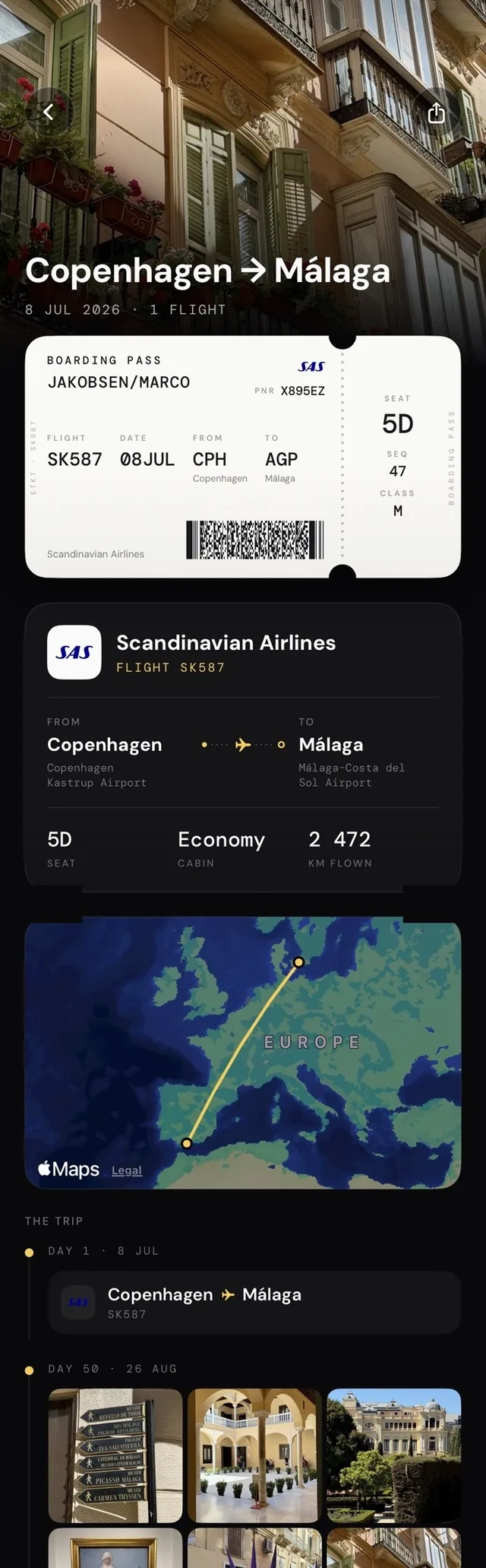
Route, flight, date and seat, read automatically.
02 · Keep it
Your pictures, your route on a map, your stats.
03 · Share it
Send the trip card. Works offline.
How it works
Your boarding pass becomes a trip, photos, route, seat, and the stub tears off into your collection. Nothing to type.
When a trip is kept, when the photos land, and a year later, a little nudge to look back.
Flights, kilometres, countries, window-seat ratio, counted from what you actually flew. Nothing tracked, everything kept.
Every boarding adds a stub to the drawer, and another three letters to your map.
Your passes and photos live on your phone. Nothing is uploaded, nothing is tracked.
Pricing
Your first passes are free to keep, forever. Upgrade when the drawer fills up.
Honest pricing: the free tier stays free, and Pro’s price shows in the App Store before you pay a krone. Cancel any time in your Apple ID settings.
FAQ
Anything else? Say hi.
Yes, you create a free account the first time you open Stubbie; it takes a few seconds. Scanning, your collection and your stats then work offline. Pro is handled by Apple through the App Store.
Paper passes (via the camera), screenshots, PDFs and passes in Apple Wallet. Stubbie reads the route, flight number, date and seat. You don't type anything. More on the boarding pass scanner.
No. Stubbie shows photos from your own library taken during the trip. They stay on your device; nothing is uploaded by the app. The details live in the privacy policy.
Yes. Scanning, your collection and your stats all work without a connection. Stubbie is offline-first by design.
Unlimited trips, shareable trip cards, deeper stats with a yearly recap, and it keeps an independent app independent. Free stays free. See pricing.
No. Stubbie is a keepsake, not a tracker or a booking app. It's the digital version of the ticket stub you keep in a drawer, with a flight log that fills itself.
Yes. You can export your collection from the app at any time, and deleting the app deletes the data on the device with it.
Stubbie is iOS only for now. Get it for iPhone, and join the launch list to hear when Android boards.
Stubbie is a boarding pass scanner and a personal flight log in one, but really it's a keepsake. Scan any pass (paper, screenshot, PDF or Apple Wallet) and the flight becomes a ticket-stub card with your route, your seat and the photos you took while you were there.
No spreadsheets, no typing, no live tracking. Just your flight history, kept beautifully on your phone: offline, private, and yours to export any time.